


Every teacher knows the challenge: Students complete homework at 9:00 p.m., get stuck, and have to wait until the next day’s class for help. By then, you’re facing a mountain of assignments that all show the same misconception.
What if students could get immediate help outside class when they need it? Snorkl AI allows them to do just that. Instructors put the assignment problems into Snorkl AI, and students answer within it. They then receive immediate, detailed feedback about their work.
Students can respond to Snorkl prompts verbally, in writing, or even by creating lengthy video responses. These options allow students to go into detail about their thought processes and solutions, thus making their thinking visible. This allows Snorkl to focus on problems with students’ thought processes, rather than just the product. The resulting feedback better gets to the heart of the students’ misunderstandings and thus better aids their learning. Moreover, it’s simple for both teacher and student to use.
Getting started
The first step is to create a classroom for students to join. As a teacher, you can have up to 20 free activities or pay a fee for the upgraded version of the application. (Pro tip: You can reuse the same prompts each semester because they don’t count as multiple activities. Even after four semesters of doing this task, we are still at only three unique prompts.)
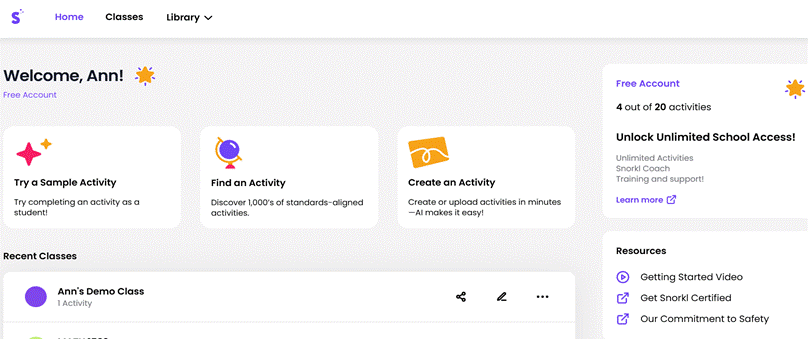
The above screenshot illustrates what the Teacher Home screen looks like. Once you have set up an account and classroom, you can then create question tasks or select from Snorkl’s database of free prompts, which include prompts for different fields at various grade levels.
Not interested in any of the provided tasks? No problem. Creating your own activity is as easy as copying and pasting from an existing activity you have. You can also tailor the AI feedback to your exact classroom needs by editing the given feedback on actual student work, and Snorkl AI will learn from your edits to apply the thinking in the future. We tend to like Snorkl’s problems, so let’s take a closer look at one of our favorites.
The student’s perspective
An example prompt that a college algebra teacher might use appears below. Under the student mode within the teacher login, we demonstrated how a student might have answered the problem. We purposely incorrectly answered the first part of the task of simplifying an expression involving complex numbers. We can share the link in our class, and students are able to go straight to the prompt from the given link. The work below gives you an idea of what students can see from their side.
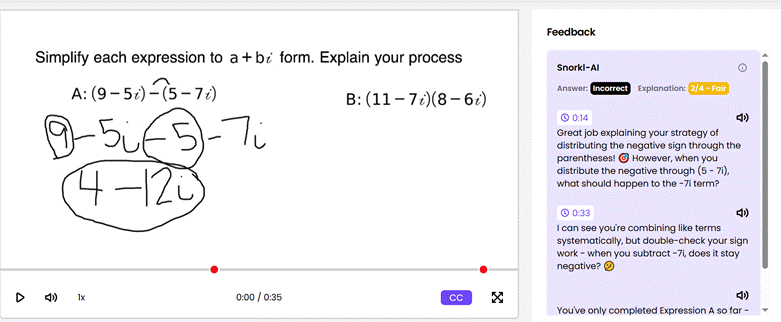
Here, the student sees the prompt, which includes verbal or written work (or both), as well as friendly AI feedback (with a score ranging from 0 to 4) that includes time stamps next to each comment that can help students gain more knowledge about the given feedback. Snorkl doesn’t hand students the answer when they get something wrong. Instead, it provides critiques that guide them to figure it out themselves, then allows resubmission. This means students actually have to learn from their mistakes rather than just copy corrections.
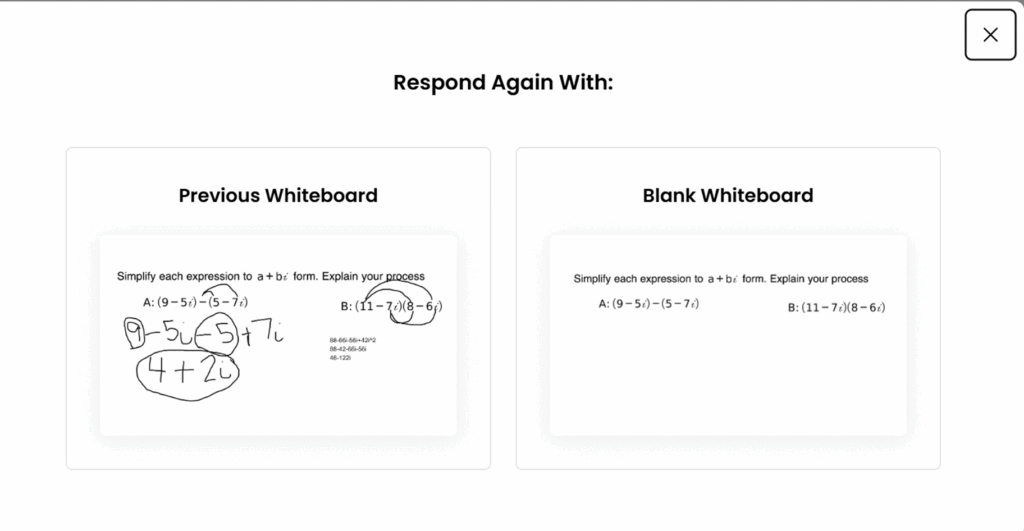
As the above image shows, when students respond again to the prompt, they have the option of starting from either the previous whiteboard or a clean one. We decided to use our previous whiteboard and just erase parts that were incorrect before completing the problem again. Below is our second submission with a perfect score. (Note that students, depending on their preference, can switch from using a drawing feature to typing. We demonstrated using both in our response. For our fellow mathematics teachers, Snorkl is currently beta testing a virtual math function keyboard.
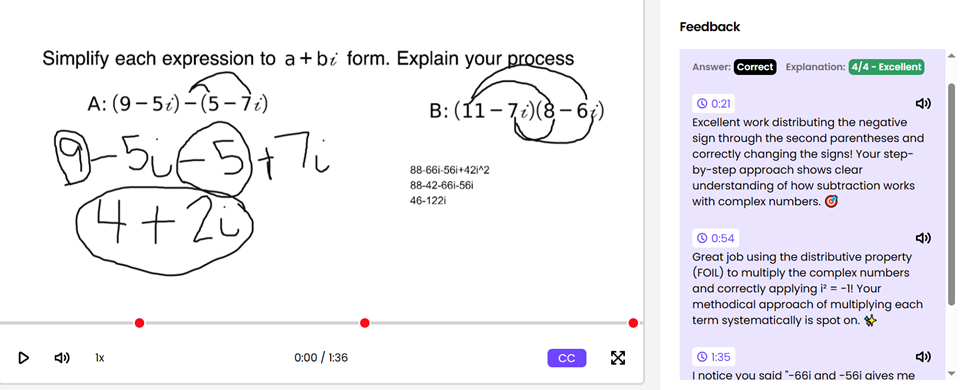
We teach many future math teachers and instruct them about not only mathematics but also pedagogy, so we tell them to do the problem incorrectly at first to see what type of feedback they receive from Snorkl and reflect on it. Do they feel the feedback is helpful for student growth? Then we ask them to redo the problem until they are satisfied with the outcome. Once the future teachers have submitted their responses, we encourage them to look at the work from other students to learn how they have solved the problem to help them grow as educators and learners. What a great way to learn.
Snorkl from the teacher’s viewpoint
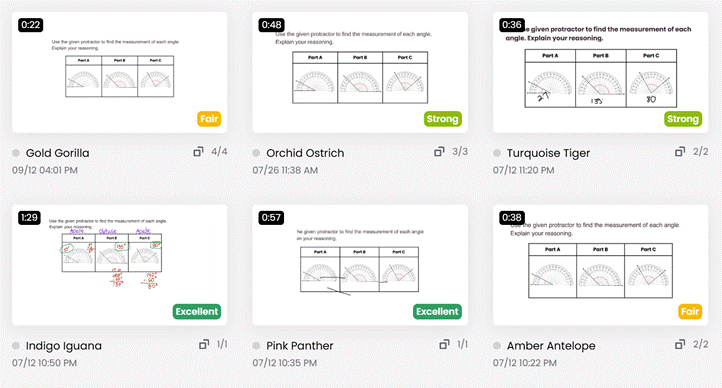
As teachers, we can use the Teacher Dashboard to quickly see how our students are doing on the assignment. The system groups student responses by correctness as well as scoring level (excellent, strong, fair, or not yet). Below is a sample dashboard of a problem we have given in a future elementary mathematics methods course. (Pro tip: You can take off students’ names and replace them with alliterative pseudonyms created by Snorkl.)
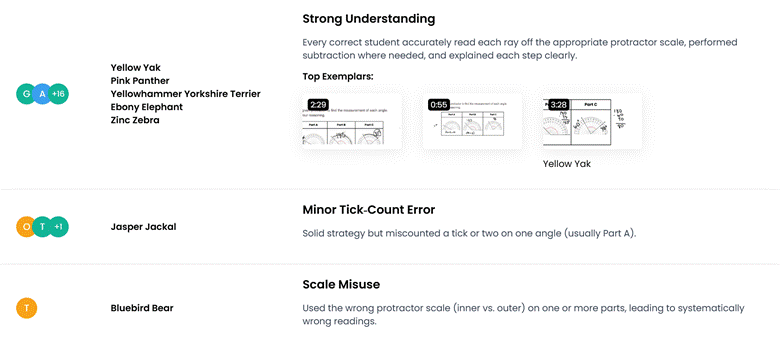
If you want more detail about your students’ work, you can use the Insights tab to see AI analysis of students’ understanding and certain common errors. From the screenshot below, you can see that some students had a strong understanding of the question, whereas other students made certain specific errors, such as miscounting tick marks on the protractor or using the wrong scale. With this added Snorkl teacher component, we can remediate students in small groups or go over common mistakes as a whole class.
What do students think?
The response from students and other faculty has been overwhelmingly positive. Students enjoy the ability to receive instant feedback and correct their mistakes through trial and error. The students are future teachers, so this is great practice for them to overcome their fears of teaching mathematics to others through answering mathematical tasks. The students get the opportunity to realize that teaching mathematics doesn’t have to be an intimidating task. They receive practice and see how practice can be helpful to them overcoming their anxiety with teaching. During our prior conference presentations, educators are also amazed at all the wonderful components and versatility that Snorkl affords to a varied set of learners and classrooms. The AI-powered tool works in so many disciplines that the possibilities are practically endless.
Through our work with Snorkl, we have grown considerably in our understanding of how a powerful AI can transform learning in a classroom. Give it a try and see what insights your students will glean from it as well.
Ann Wheeler is a professor of mathematics and Sarah Cooley is a lecturer in mathematics at Texas Woman’s University.
The post Using Snorkl AI to Enhance Learning and Engagement appeared first on The Teaching Professor.