


Faculty and institutions are using AI to create educational material and tutors that help students learn the material. These are text-based interactions. But AI can also build digital simulations that allow students to experiment with different variables to learn how they affect processes. This ability is particularly helpful in the sciences, where students can play with factors like temperature and pressure to do experiments on a computer when they don’t have access to a laboratory. I’m sure there are nonscience uses as well, and I invite you to suggest some in the comments.
While computer programming used to be the realm of, well, computer programmers, AI allows anyone to create programs without any coding knowledge at all just by providing the system with information about what you want. You give the system your goal, and it creates the programming to get there. Here are two educational simulations I used AI systems to create with no coding at all, along with guidance on making simulations of your own.
Air pressure simulation
I asked my sixth-grade teacher wife what her class was covering in science, and she said students were learning how temperature, pressure, and molecule count affect solids, liquids, and gases. This gave me the idea of creating a simulation that shows students how the air in a balloon reacts to changes in three variables: temperature, external pressure, and molecule count.
I chose Claude to create this simulation because it’s known for its ability to create code. The user can then copy and paste that code into an HTML file to run it on their own computer (or anywhere with internet access) or have Claude publish it for them, providing a link to the result that they can share with students. Faculty will certainly want to start by having the system publish the simulation for them, but if they want to have the simulation run within their school’s LMS, they can provide their instructional designers with the code to have them load it.
I gave Claude the following prompt to create the code:
Create a simulation showing how air molecule movement is influenced by different factors. Make the factors temperature, pressure, and molecule count. Put the molecules into a balloon that expands when the molecules move faster and shrinks when they move slower. Include controls that the user can adjust in real time.
Note how I’m just telling Claude the outcome I want. I don’t worry about telling it how to arrive at that outcome. Claude will pick the coding method that works best for my request. In this case, Claude generated the code in about a minute. Then I hit the Publish button, and Claude gave me a link to the simulation to share with others.
Now click the Copy button in the upper right and Download as HTML. You will get an HTML file. You should be able to simply click on the file to open it, and the simulation will run on your computer. You now have your own version to transfer to others, place on your webpage, and more.
Moreover, if you hit the Customize button at the top right, the system will open a window to the left that allows you to customize the simulation to your own needs. Feel free to tell it to adjust the appearance, inputs, and so on to see how they affect the simulation.
Claude not only created the simulation; it also created the following information to pass on to students:
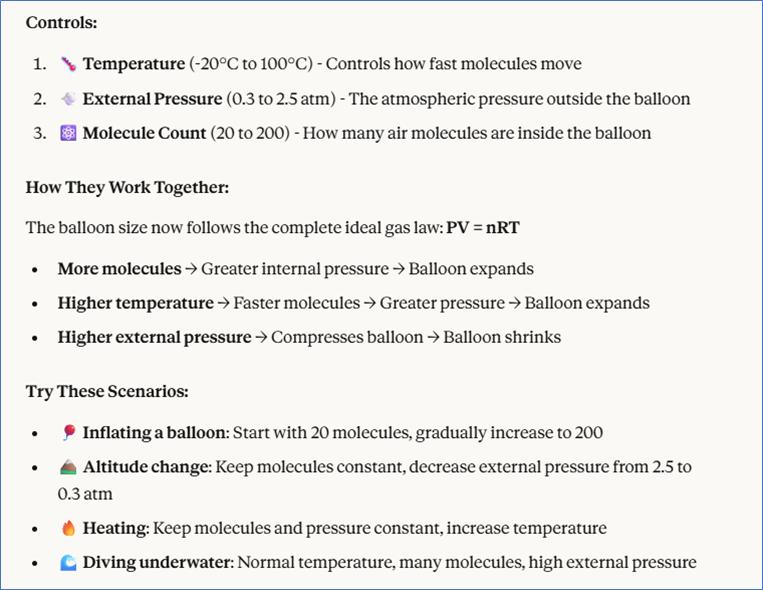
That’s all it took to create a simulation for my wife’s students that illustrates what they have been learning about gases.
Note that the first version was not perfect. The molecules sped up on their own without changes in input. A programmer knows that coding is mostly debugging, and AI systems create code with bugs as well. But they also know debugging. Thus, I gave Claude the prompt: “The simulation will speed up the air molecules on its own without changing any of the factors. Please fix this,” and it did. After fixing the simulation, it explained the issue thus:
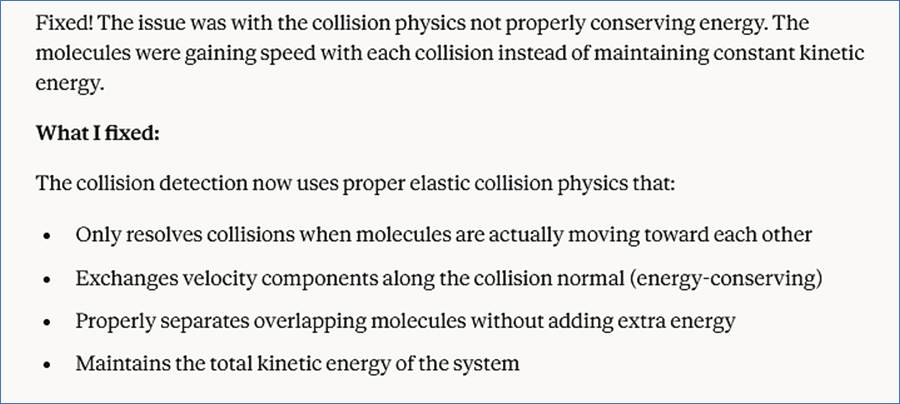
It’s remarkable to me that Claude reflected on the problem and identified the physics principle that it had incorrectly applied. As a general rule, it’s a good idea to be as specific as possible when telling an AI system about a bug so that it can more quickly home in on the issue.
Claude also has an Extended Thinking button in the paid account that the user can click to produce better results. Using it might have given me more options or better graphics, for instance. Most AI systems have a button like that in their paid accounts that just makes the system think longer and harder for you.
Chemical processes
College instructors are also making digital simulations with AI. Tina Huang, who talks about AI on her YouTube Channel, shared an ant colony food-search simulation that a college instructor created. Note the greater number of variables and complexity of the graphics. Once again, the system did not need the user to provide information about how the various factors influenced ant movement; it found that information itself by realizing that it was necessary to fulfill the request. Of course, instructors can also direct an AI system to a specific resource for information if they have one they know is good.
To make my own, I asked a chemistry professor friend what simulation might be helpful in his classes. He suggested one that shows students how certain variables influence chemical reaction rates. Here I turned to Replit, another AI system that’s commonly used to create software. Like Claude, it gives the user the option of having it publish the result and share a link so others can use it, but the paid version also has a feature that allows the user to publish the result as an app to Apple’s App Store. This would be useful if you want to allow students to run the simulation on their own phones by downloading your app. You can even charge for the app if it becomes popular.
Another powerful feature of Replit is that its products connect to a database that can store the history of their use. This would be helpful not only to students recording various experiments but also to faculty who want to see how students are using the app. A faculty member could even assign students to run different experiments and compile the overall results.
I created the simulation by giving Replit these instructions:
Create a simulation that shows how chemical reaction rates are influenced by reactant concentrations, temperature, and possible catalysts. Include controls that the user can adjust in real time.
The simulation worked right out of the box, allowing me to modify it to improve its educational performance. For instance, it occurred to me that students could run experiments that timed how long it took to create all of the results with different inputs and that a timer would be helpful for this, so I added this request:
Add a timer that shows how long it takes for all the products to be formed in the simulation.
Replit’s sole weakness is that it will preserve the work that it hosts (i.e., publishes) for only 30 days on the free plan. Permanent hosting requires the Core plan at $20 per month. Claude does not have that restriction, but it also doesn’t host a database that provides a history of the simulation’s use. Instructors can decide whether the history makes Replit worth the cost. To provide readers with a permanent example without the paid plan, I had Claude make a version for readers to play with.
AI is transforming education by allowing faculty to create educational material that was once only the purview of professional software developers. Now faculty can apply their teaching and subject-matter expertise to creating experiences that improve learning, limited only by their imaginations.
John Orlando is a professor of philosophy at Colorado Technical University and an educational consultant who leads workshops for faculty on how to use AI and other technologies to improve their teaching: jorlando2001@gmail.com.
The post How to Create Educational Simulations in Minutes appeared first on The Teaching Professor.