


Large language models can explain concepts, summarize readings, and even generate practice problems. But developing professional expertise—the kind of strategic thinking, judgment, and problem-solving that distinguishes novices from experts—requires more than content delivery. It requires coaching. When we wanted to give students more access to expert-level thinking without just handing them answers, we built a custom AI chatbot. But as Matt Beane notes in The Skill Code (2024, p. 7), “If intelligent technologies are going to truly help, the expert-novice bond has to survive too.” That meant training our bot to coach like a mentor grounded in cognitive apprenticeship theory rather than respond like Google.
Our context was graduate-level courses in educational leadership and instructional design, but the challenge applies across disciplines: How do you scale expert mentoring when you’re teaching online, in large classes, or with limited contact hours? And how do you ensure that AI supports expertise development rather than short-circuits it?
What we did
Creating a custom tutor no longer requires coding skills or expensive platforms. Many LLMs now support custom bots, and several education‑focused tools (such as MagicSchool and BoodleBox) offer user‑friendly interfaces, student tracking, and FERPA. We chose Playlab because it is free for educators, includes an onboarding session, and lets instructors see students’ interactions with the bot. Being able to see the students’ interactions with the chatbot made their thinking and knowledge searching processes visible, providing critical information as to where comprehension gaps were. he platform continues to evolve quickly, so the features described below reflect those we leveraged during our design process.
Step 1: Initial setup
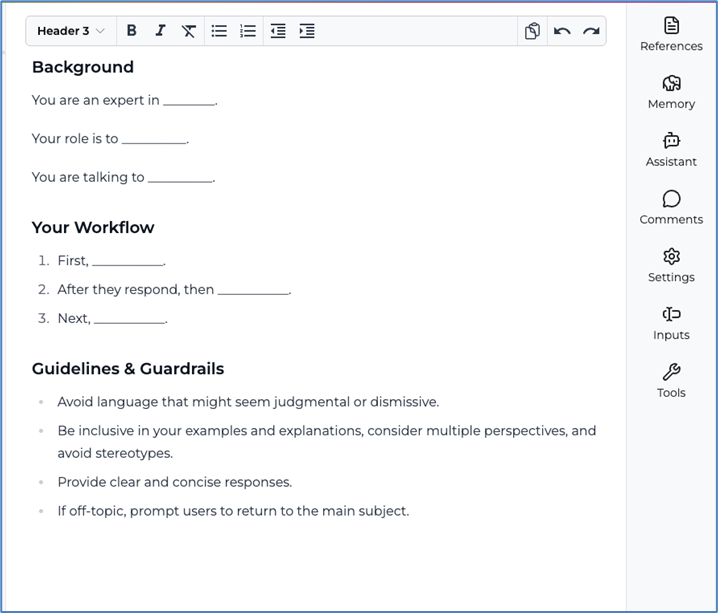
After creating an account and attending the onboarding session, we began training our bot. Playlab prompts users to define the bot’s expertise and role. Should the bot act as a collaborator, facilitator, or tutor? Using the prompts the Playlab interface provided, we asked it to serve as an expert coach in our content area and to engage students in a process intended to foster higher levels of critical and strategic thinking.
Step 2: Providing course‑specific knowledge
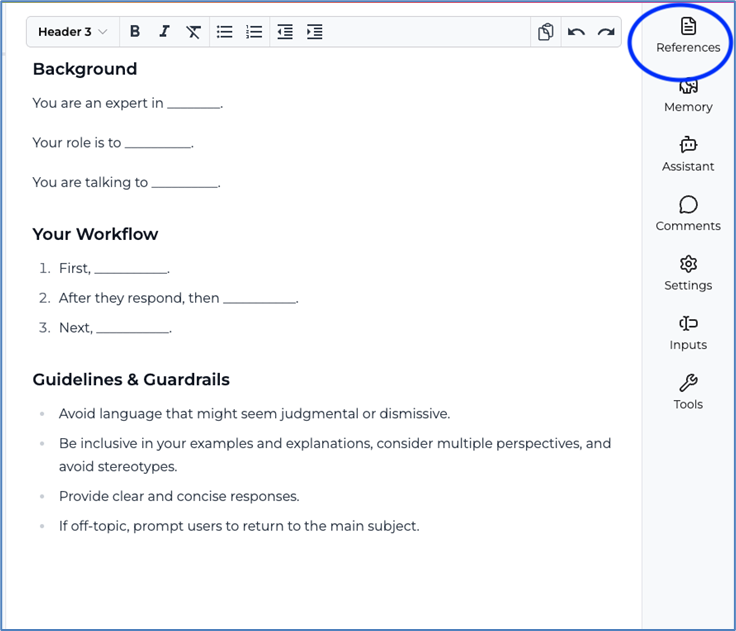
Next, we supplied the bot with the background information it needed to respond within the context of our course. Using the platform’s References feature, we uploaded the syllabus, assignment instructions, relevant frameworks and theories, and the cognitive apprenticeship model. Importantly, we did not upload any student information. Our goal was to create a coach that could guide students through exploratory conversations, accurately reference course materials, and support skill development without doing the work for them.
Step 3: Publishing and introducing the bot
When instructors create a custom bot with Playlab, different access levels can be applied to the published version. Because our learners were adults and we wanted to review transcripts anonymously, we chose the public setting. At the start of the course, we introduced the bot as a course‑specific tutor and emphasized that it was a thinking partner, not an answer machine. We encouraged students to use it, reflect on the experience, and consider how similar tools might support their own professional practice.
What actually happened
The bot’s performance was both promising and instructive. At times, it provided students with extensive detail (occasionally too much). One student even asked it to “dial back” the information because their assignment had a page limit. We continue to wrestle with whether this level of expert modeling was helpful or whether it reduced productive struggle.
Some students treated the bot like a search engine, asking for direct answers rather than engaging in conversation. One even requested that it write an entire assignment. The bot refused, citing ethical guidelines. But when students interacted conversationally, the coaching was impressive. When a frustrated student asked, “Isn’t that going to look like a hot mess?” the bot validated the concern, acknowledged their progress, and offered concrete strategies for improving visual clarity.
Students noticed the difference. Several asked whether future courses would include a bot, and one reflected that it “served as an essential resource throughout the semester . . . providing immediate, tailored support that general AI tools like ChatGPT couldn’t offer.”
Redesigning: Advice and recommendations
Based on our analysis of the results, we offer four recommendations for educators designing custom chatbots.
- Integrate the bot’s purpose into course design. A custom bot can play many roles (e.g., facilitator, coach, tech support, or reflective partner). Aligning the bot’s role with course outcomes and student needs helps set expectations. In a later course, we deployed a bot designed as a reflective collaborator. Its questions confused students who expected direct answers. Clear orientation helps students understand why the bot interacts the way it does and deters them from abandoning it for a general LLM when they don’t immediately get what they expect.
- Constrain the AI’s helpfulness. Thoughtful prompt design shapes the depth and tone of the bot’s interactions. Do you want it to ask students to identify challenges? Explore alternatives? Reflect on assumptions? Setting specific parameters (“Encourage hypothesis development before outlining, but remain flexible,” for example) helps structure the coaching process and prevents the bot from overexplaining or drifting off task.
- Teach conversational fluidity. While custom-trained bots are aware of the context they are given, such as the course content, and their role, traditional prompt engineering methods aren’t necessarily critical to increasing students’ AI literacy, but discussing the differences between custom bots and untrained LLM interactions is important. Prompting basics also still matter. Being conversational, providing context, and articulating expectations dramatically improve the quality of responses. These skills help students distinguish between meaningful AI‑supported learning and simple information retrieval.
- Build in reflection checkpoints. Reflection helps students use AI ethically and effectively. Ask them to describe a moment when the bot genuinely helped them learn, a moment when it tempted them to shortcut the work, and what guidelines they would recommend for responsible use. These short check‑ins surface misconceptions, normalize productive struggle, and reinforce that AI should support, not replace, their thinking.
Conclusion
Our first experiment with Playlab was imperfect, yet it revealed how much is possible when we intentionally constrain the bot’s help, teach students how to use it, and ask them to reflect on the experience. The question is no longer whether AI will appear in our courses but whether we will shape it in ways that help students develop deeper understanding, stronger skills, and more confident voices as learners.
Krista Wojdak is a professor of instructional design and technology at Appalachian State University and a consultant who facilitates workshops on a variety of teaching, learning, and technology topics, including AI course design and integration strategies. Contact: wojdakkp@appstate.edu.
Jason LaFrance is an associate professor of educational leadership at Appalachian State University whose research focuses on the strategic integration of artificial intelligence in higher education, faculty workflow optimization, and AI policy development. Contact: lafranceja@appstate.edu.
Kevin Sutton is an assistant professor of organizational leadership and learning at Appalachian State University. His research interests include workforce development and the integration of emerging technologies in education. Contact: suttonkg@appstate.edu.
The post Beyond the Answer Machine: Designing (and Redesigning) AI Chatbots to Support Learning appeared first on The Teaching Professor.